I directed an AI-assisted design project for Still, a mobile password manager concept. The result is an editable Figcraft prototype with light and dark themes, error and recovery states, and a developer handoff. It is a design study; no working password manager was built.
Still is a self-initiated product design exercise. I wanted to design a mobile password manager past its main vault screen, including the parts a developer would need to implement: setup, unlocking, editing, validation, recovery, and settings.
The first version had six screens, enough to show the visual direction but not much else. What happens when saving fails? Where does someone go when fingerprint unlock is unavailable? Does deleting an item also remove it from Favorites? Can someone recover after the Undo message disappears?
Those questions decided what to add. The goal was a prototype with visible states and consistent navigation.
Directing Codex in Figcraft
I used Codex to create and revise the design in Figcraft. Codex did much of the generation and checking. I set the scope through successive requests for more complete screens, interactions, Material icons, dark mode, and the final handoff.
One Visual Foundation
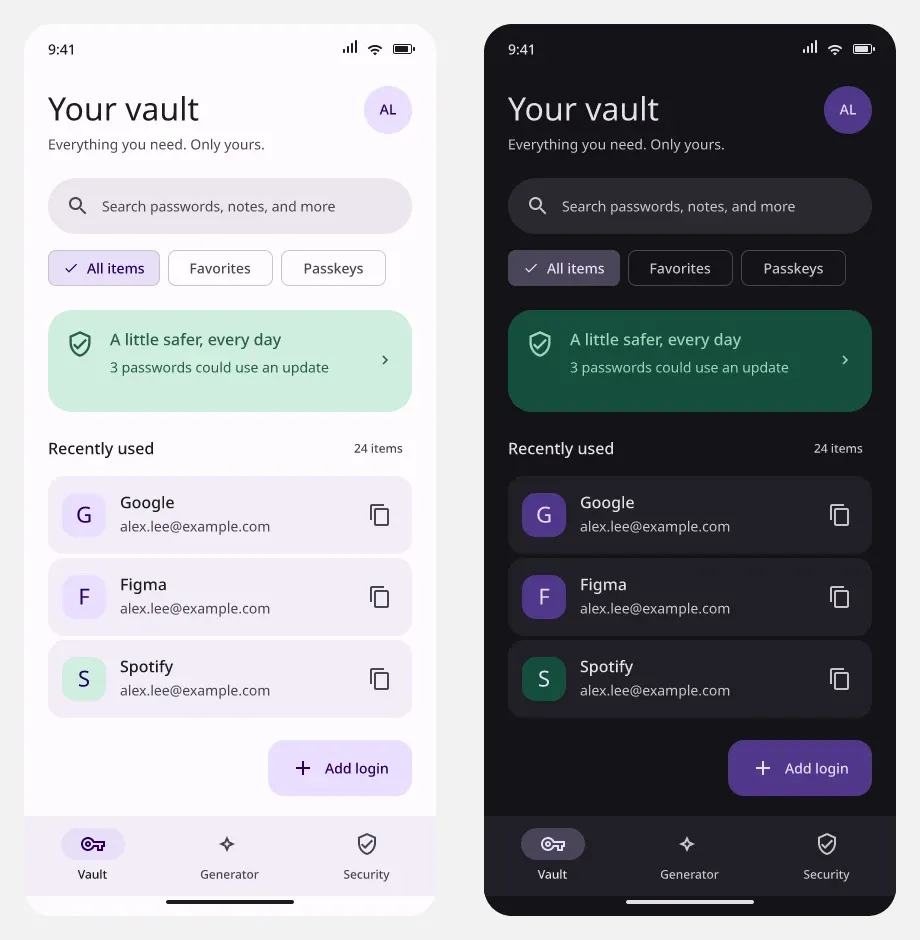
The interface uses Material 3 colors, seven Noto Sans text styles, and official Material Icons Outlined. Lavender marks primary actions, green groups security feedback, and error colors distinguish validation and failed operations. The reference frame is 412 by 892 pixels, with shared spacing and touch areas.
The same vault layout in both themes, using semantic color roles.
Making It Respond
The vault filters update the selected chip, visible rows, and item count together. Password controls reveal and mask fictional values. The generator responds to its options, and the sample save and password-replacement flows retain the account being edited.
Errors with a Way Forward
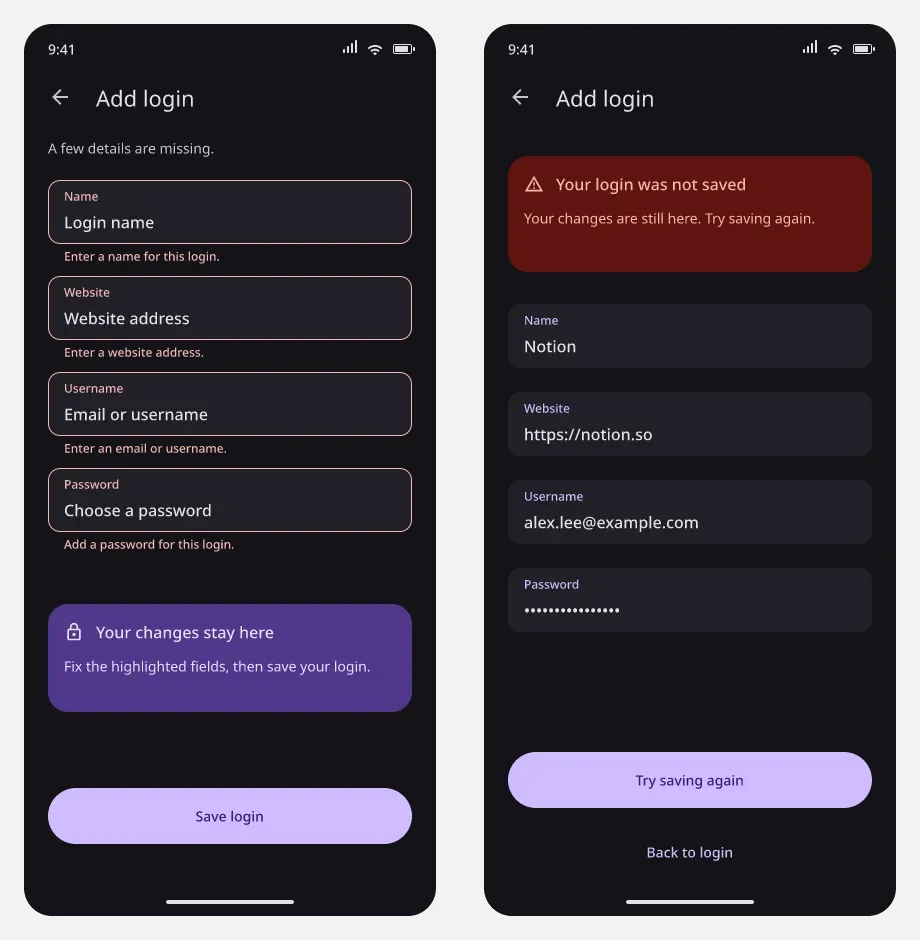
I added required-field, invalid-website, and password-mismatch examples, along with save retry, fingerprint fallback, and backup recovery. A failed save retains its sample draft. Deletion has a five-second Undo window, and Recently deleted provides another route to restoration after it expires.
Validation explains what to fix; a failed save keeps the draft available for retry.
Dark Mode Through the Whole Flow
All 53 screen compositions have dark versions. The dark prototype has its own components, navigation destinations, and session variables, so interactions stay in the chosen theme. Dynamic switch and filter colors were adjusted too.
What I Handed Over
The final file includes six developer reference boards covering tokens, typography, components, navigation, timing, implementation gaps, and acceptance checks. JSON and CSV exports list the tokens, component patterns, all 106 mobile frames, and 24 prototype entry points. The notes identify which patterns are native component masters and which are editable frames.
Part
Tool or Format
Purpose
Design
Figcraft
Editable screens, vectors, components, and prototype actions
Visual foundation
Material 3
Shared color roles with light and dark values
Icons and type
Material Icons Outlined, Noto Sans
Consistent controls and text styles
AI assistance
Codex
Design generation, revisions, and verification scripts
Handoff
Native design, Markdown, JSON, CSV
Reference boards, specifications, and inventories
What the Checks Showed
The delivered package has 106 mobile screens (53 light and 53 dark) plus six handoff boards. The final checks ran the prototype’s native actions across 20 light and 20 dark state scenarios. They also confirmed that adding the handoff kept the existing screen nodes, variables, and styles, and that the reference boards had no text overlap or overflow.
All 53 dark screen exports from the combined file matched their standalone counterparts. Earlier native presenter checks covered eight recovery scenarios, including loading transitions, save retry, fallback unlock, backup retry, and Undo. Those presenter checks were not repeated after the later icon, theme, and handoff changes.
These checks only show the prototype is consistent with itself. There was no user research or usability study, and there are no adoption or business results.
What Is Still Not Built
Tapping a field repairs it with a predefined example, and the generator draws from a finite set of synthetic strings. Copy confirmations, fingerprint unlock, autofill, and backups are simulated. No real credentials were used.
A working app still needs real text entry, secure generation, authentication, persistence, platform integrations, and real backups. I have not chosen an application framework or a security architecture. Adaptive layouts, keyboard behavior, text scaling, and assistive technology also need implementation and device testing.
Related Notes
Next step
Have a project in mind? Let's talk.
Tell me what you have and what you need. I usually reply within one working day with how I'd approach it.